In February 2026, Heroku quietly published a blog post announcing it was moving to a "sustaining engineering model." No new features. No new enterprise contracts. Security patches and maintenance only. If you've been in tech long enough, you know what that means. It's the stage before end-of-life. The product isn't dead yet, but Salesforce has stopped investing in its future.
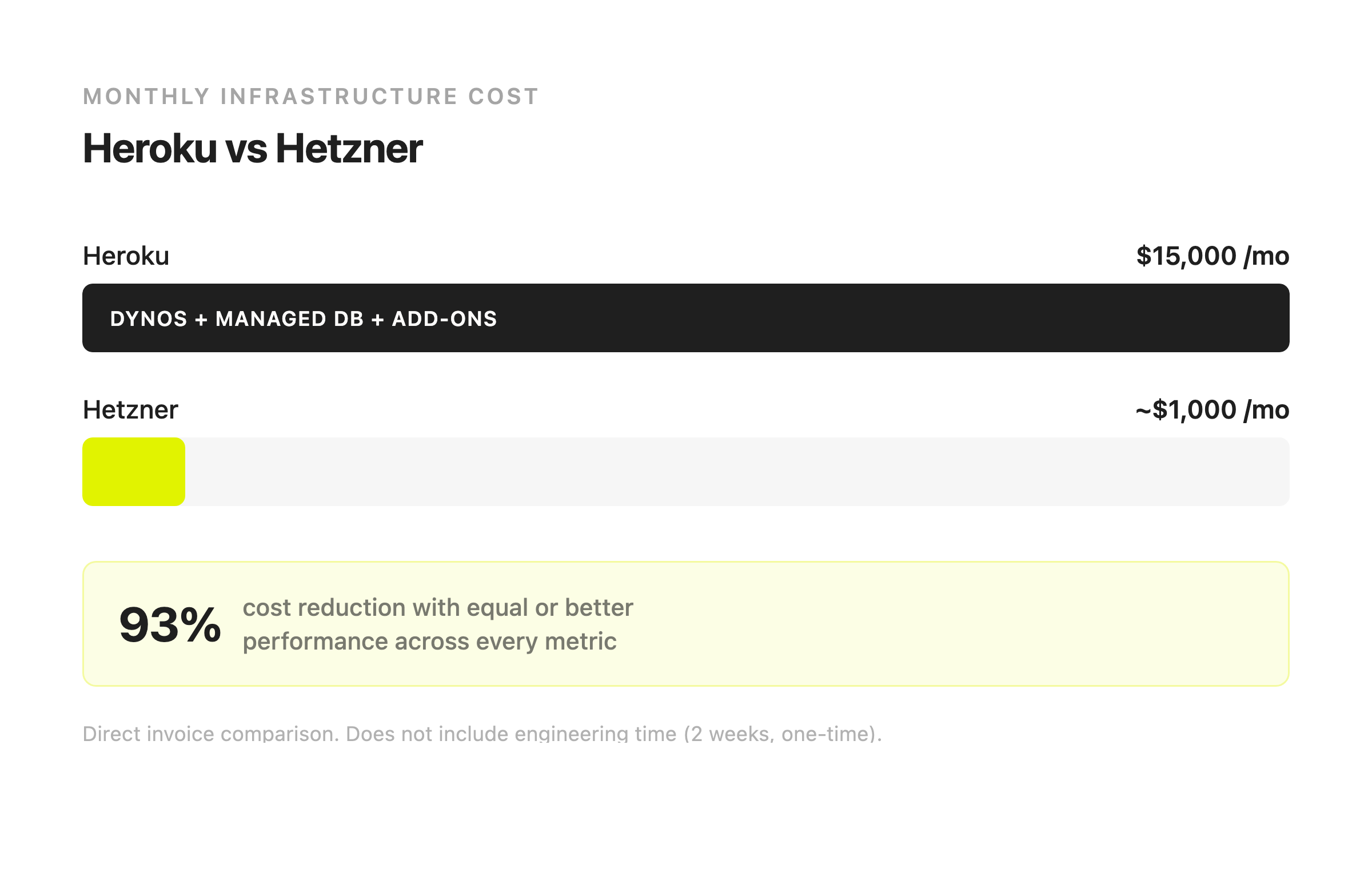
We'd already left by then. About a year earlier, we looked at our $15,000 monthly Heroku bill, looked at what we were actually getting for it, and decided to move our entire production platform to self-hosted infrastructure on Hetzner Cloud. Two engineers, two weeks, zero downtime. Our monthly bill dropped to around $1,000 and we ended up with roughly 10x the performance.
This is the full story. How we made the decision, what we built to replace Heroku, what broke along the way, and what we'd tell you if you're sitting on a growing Heroku invoice right now and wondering what your options look like.
Why we left
We run a deep-linking and attribution platform that handles about 15 million devices. The backend is Rails, PostgreSQL for the database, Redis for caching and job queues, and Sidekiq for background processing. It's a standard SaaS architecture. Nothing unusual, nothing that should cost $15,000 a month to run.
But on Heroku, it did. The breakdown was roughly: performance dynos for the web layer because standard dynos couldn't keep up with our traffic. A premium managed Postgres plan because we needed more connections and wanted some level of replication. A Redis add-on because Heroku doesn't include Redis. Then logging, monitoring, and a handful of smaller add-ons on top. Each one seemed reasonable when we added it. Together, they added up to a number that stopped making sense a long time before we actually did something about it.
The cost was bad, but it wasn't the breaking point. The real problem was that Heroku's managed services were actively getting in our way.
We wanted to set up a delayed database replica. The idea is simple: a second copy of your database that applies changes with a time lag, say two hours. If someone ships a migration that drops the wrong table or corrupts data, the replica still has the clean version. You catch it, you recover from the replica, you go on with your day. It's a basic safety net for any production database. Heroku didn't offer it at any tier.
We wanted connection pooling we could actually tune. Our Rails app opens a lot of database connections, and Heroku's managed Postgres was always tight on connection limits. We knew PgBouncer would fix this, but Heroku gave us no way to configure it properly. Their connection pooling was a black box with settings we couldn't change.
We wanted control over our backup schedule and retention policy. Heroku gave us automated daily snapshots with limited retention. That's fine for a side project. For a platform handling millions of devices and processing thousands of events per second, we needed point-in-time recovery. The ability to restore the database to any specific moment, not just last night's snapshot. Heroku didn't offer that.
Every time we hit one of these walls, the answer was the same: upgrade to a more expensive plan that still didn't have what we needed, or accept the limitation. At $15k a month, "accept the limitation" stopped being a real option.
Why Hetzner and not AWS
When you tell people you left Heroku, the first question is always "so you went to AWS?" We didn't. Here's why.
AWS pricing is famously unpredictable. You spin up some EC2 instances, add an RDS database, put an ALB in front, enable CloudWatch logging, and suddenly you're getting invoices with line items you didn't know existed. Egress fees are the classic gotcha: every byte of data that leaves AWS costs money, and for a platform serving millions of API requests per day, that adds up fast.
But the bigger issue is that AWS managed services are the same model as Heroku, just with more knobs. RDS gives you a managed Postgres database. It's more configurable than Heroku's, but you still don't have full control. You still can't SSH into the box. You still pay a premium over running Postgres yourself. ElastiCache is managed Redis with the same tradeoffs. You're paying for convenience and giving up control, which is exactly what we were trying to get away from.
Hetzner is a different proposition entirely. Dedicated cloud servers at a flat monthly rate. A server with 8 vCPUs and 32 GB of RAM costs a fraction of what the equivalent EC2 instance costs. No egress fees worth thinking about. No surprise bills at the end of the month. European data centers with solid connectivity. We know exactly what we'll pay every month and it's the same number whether we push 100 GB or 10 TB of traffic.
For a company that just spent a year watching an infrastructure bill climb from reasonable to absurd, the predictability alone was worth the switch.
What we built
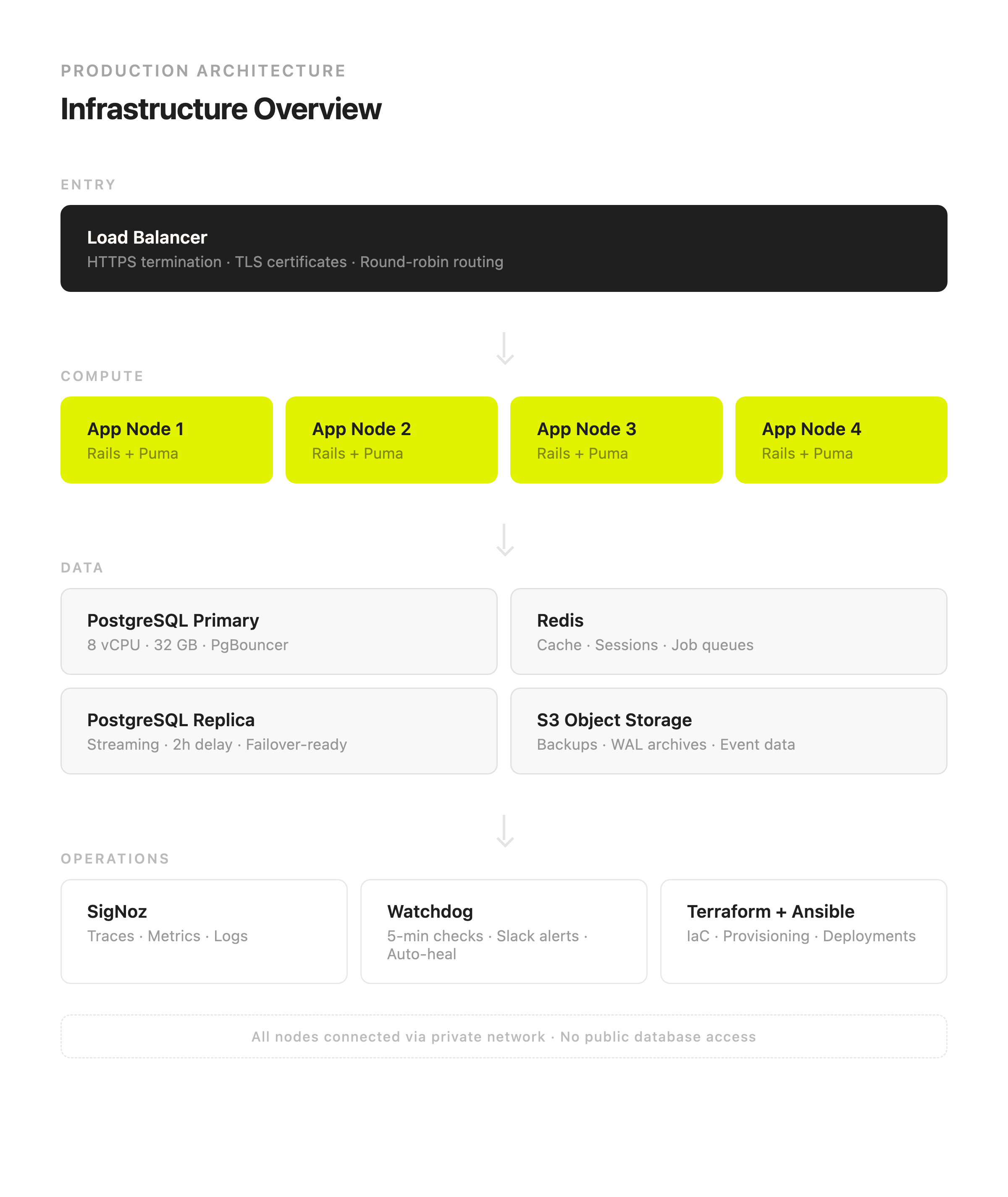
The entire infrastructure is defined in code. Terraform provisions the servers, networks, load balancers, firewalls, and DNS records on Hetzner Cloud. Ansible handles everything on top of that: installing and configuring PostgreSQL, Redis, the application servers, monitoring, backups, cron jobs. It all lives in a single git repository. Changes go through pull requests just like application code. If we needed to rebuild the entire production environment from scratch tomorrow, we could do it in under an hour.
That alone was a major upgrade from Heroku. On Heroku, our infrastructure was a collection of add-ons, config vars, and settings scattered across a web dashboard. There was no way to version it, diff it, review changes, or reproduce it reliably. If something went wrong with the configuration, figuring out what changed and when was mostly guesswork.
Compute layer
Four application servers sit behind a Hetzner load balancer that handles HTTPS termination and distributes traffic with round-robin routing. All four servers are on a private network. The load balancer is the only component with a public-facing IP address. The database, Redis, and everything else are only accessible from inside the private network.
Adding capacity is straightforward. We have an Ansible playbook that provisions a new app node, configures it, and adds it to the load balancer. If traffic spikes and we need a fifth or sixth node, we run the playbook. It takes about ten minutes.
Database
This is where most of the engineering effort went, and for good reason. The database is the thing you can't afford to get wrong.
We run PostgreSQL 16 on a dedicated server with 8 vCPUs and 32 GB of RAM. In front of it sits PgBouncer for connection pooling. This turned out to be more important than we expected. Rails applications can be aggressive with database connections, and on Heroku we were constantly bumping into connection limits. With PgBouncer, we control the pool size, the timeout behavior, and the queuing strategy. Connection limits stopped being a problem overnight.
Behind the primary sits a streaming replica on a separate server. The replica receives every write the primary makes, but applies them with a two-hour delay. This is the single most valuable thing we built that Heroku never offered us.
Here's why the delay matters. Say someone ships a database migration on a Friday afternoon. The migration has a bug. It drops a column it shouldn't have, or it updates rows with the wrong values. On Heroku, you'd notice the damage, panic, and file a support ticket to restore from last night's backup, losing up to 24 hours of data. With our setup, the replica still has the clean data for up to two hours after the bad migration ran. We catch it, we promote the replica, we're back in business with minimal data loss.
If the primary server goes down entirely, whether from hardware failure or something else, we have a single Ansible playbook that promotes the replica to primary and moves the application's database connection to point at it. We've tested this in staging multiple times. The failover takes about a minute, and we have a matching failback playbook to restore the original primary once the issue is resolved.
Backups and disaster recovery
Backups are handled by pgBackRest, which is the gold standard for PostgreSQL backup tooling. Our schedule: one full backup per week, incremental diffs every day, and WAL (write-ahead log) files streaming continuously to Hetzner's S3-compatible object storage.
What this means in practice is that we can restore the database to any point in time. Not "some time last night" but "Tuesday at 14:37:22." If something goes wrong, we pick the exact moment before it happened and restore to that point. The backups run automatically on a timer and we have monitoring that alerts us if a backup is late. If no backup has completed in 24 hours, we get a Slack warning. If it's been 36 hours, the alert escalates.
Between the delayed replica and the point-in-time backups, we have two independent ways to recover from almost any failure scenario. That's more redundancy than Heroku ever gave us, and it costs a fraction of the price.
Monitoring and alerting
We use two layers of monitoring.
For application-level observability, we run SigNoz. It's an open-source alternative to Datadog that handles traces, metrics, and logs in a single dashboard. It does what Datadog does, except it doesn't cost us $500 a month and we own the data. We self-host it, we control the retention, and we're not sending our production telemetry to a third-party service.
On top of that, we built a set of watchdog scripts. These are straightforward shell scripts that run every five minutes on every database and Redis server via cron. They check disk usage, WAL file accumulation, replication lag, backup freshness, Redis memory usage, and Sidekiq queue depth. If something crosses a warning threshold, we get a Slack message. If something crosses a critical threshold, the watchdog takes action automatically.
For example, if WAL files pile up and disk usage climbs past 80%, the watchdog runs a cleanup without waiting for anyone to respond. If disk usage hits 90%, it runs a more aggressive cleanup. We built this because we got burned once (more on that below), and we decided we never wanted to be in that position again.
Every morning at 8 AM, each server sends a daily health report to Slack: uptime, disk usage, backup status, replication lag. It's not fancy. It's not a beautiful dashboard. But it means we start every day knowing whether anything needs attention.
Zero-downtime updates
On Heroku, database maintenance happens during maintenance windows that Heroku controls. You hope they don't coincide with your peak traffic. On our infrastructure, we control exactly when and how updates happen.
The process: update the replica first, since it's not serving traffic and is safe to reboot. Then fail over from the primary to the replica, so the replica becomes the new primary. Update the old primary. Then fail back. At no point does the application go down. At no point does a user see an error. The entire process is scripted in Ansible playbooks. No manual SSH sessions, no ad-hoc commands, no opportunities for human error.
What went wrong
It wasn't all clean sailing. A few weeks after the migration, we noticed that WAL files were accumulating on the primary database faster than pgBackRest was archiving them to S3. Disk usage was climbing steadily. If we hadn't been watching, the database would have eventually filled the disk and stopped accepting writes. That's the kind of failure that takes your entire application down.
On Heroku, this would've been invisible to us. Either Heroku would have handled it silently, or it would have eventually caused an outage and we would have filed a support ticket and waited. On our own infrastructure, we could see exactly what was happening, diagnose the root cause (our WAL production rate of about 16 GB per hour was overwhelming the archiving process), fix the configuration, and test the fix.
More importantly, this incident is what led us to build the watchdog system. We took a problem we discovered in production and turned it into an automated check that runs every five minutes. If WAL files start piling up again, we'll know about it in five minutes, not five hours. And if it gets critical, the system will start cleaning up on its own.
We also learned the hard way that rebuilding a database replica from S3 backups is too slow for our workload. With 16 GB of WAL per hour, restoring from S3 couldn't keep up. The replica would never catch up because the primary was producing new data faster than the replica could download and apply the old data. We switched to pg_basebackup over the private network instead, which transfers data directly between the two servers. A full replica sync now takes about 20 minutes instead of hours. It's a small operational detail, but it would have been a serious problem if we'd needed to rebuild the replica during an emergency and found out then that it didn't work.
These weren't catastrophic failures. They were things we discovered, fixed, and then automated against so they couldn't happen again. Each incident left the system more resilient than it was before. That's the fundamental tradeoff with self-hosting: you encounter problems that a managed platform would've hidden from you, but you also get to actually solve them permanently instead of hoping that someone else will.
The results
Invoice to invoice, the numbers are straightforward:
Heroku: $15,000/month.
Hetzner: ~$1,000/month.
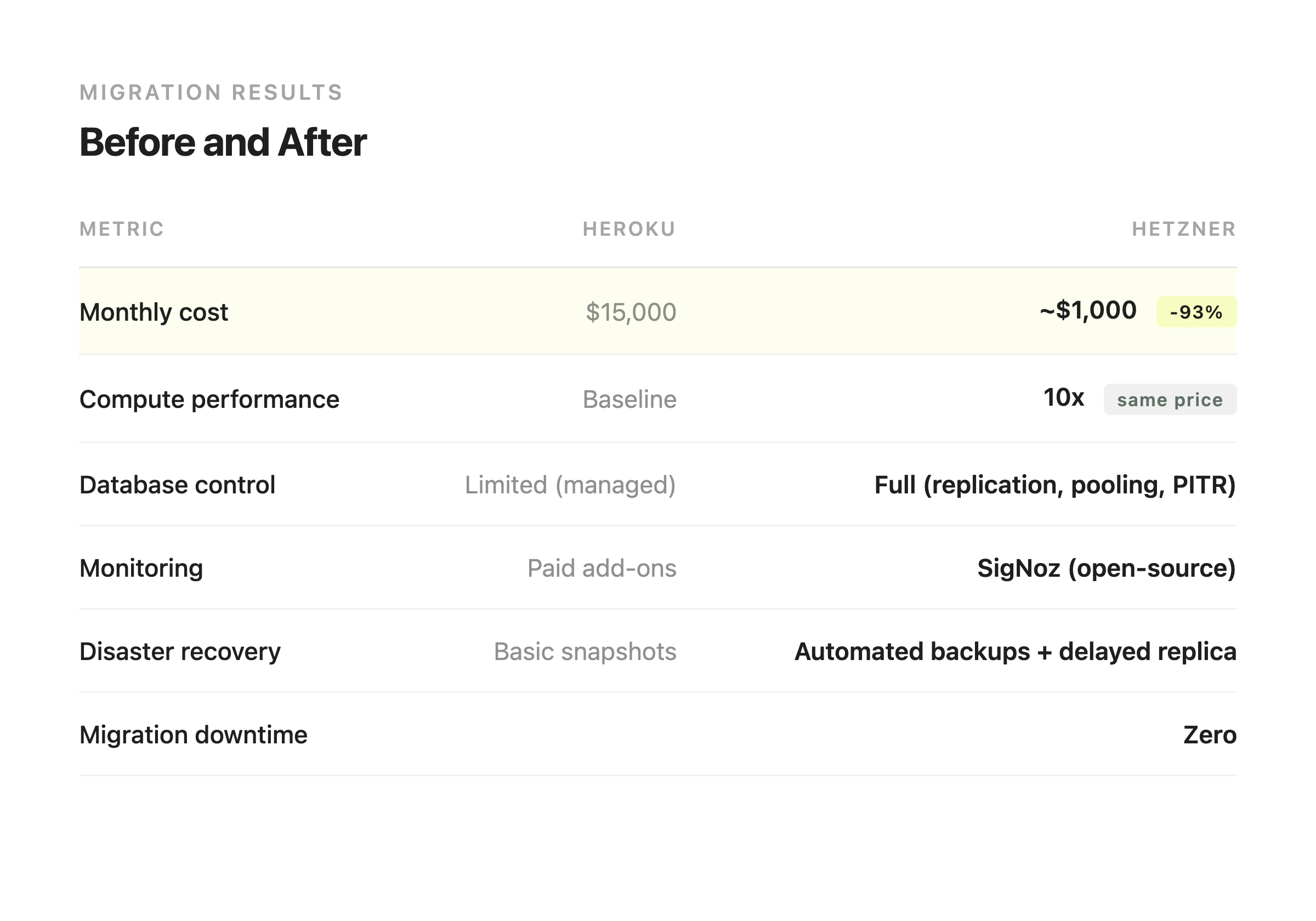
That's a 93% reduction. Same application. Same traffic. Same number of users. And for that $1,000 a month on Hetzner, we're running roughly 10x the compute and memory that Heroku gave us at $15,000. The application is faster because we have more resources and better connection pooling. Response times improved across the board without any application code changes.
The migration itself took two weeks of engineering time for two people. At $14,000 in monthly savings, it paid for itself before the first new invoice showed up. Over a full year, that's $168,000 in savings. Over two years, $336,000. For two weeks of work.
But the money is almost beside the point. What we gained that matters more:
Our disaster recovery is real. A delayed replica that protects against bad deployments, point-in-time backup recovery to any second, automated failover that takes a minute. Heroku gave us nightly snapshots and a support form.
Our monitoring catches problems before users do. Automated watchdogs, daily health reports, self-healing for critical issues. On Heroku, we waited for support to tell us what was going on with our own database.
Our infrastructure is reproducible. The entire stack is in a git repo. We can rebuild it, review changes, and understand exactly what's running where. On Heroku, our infrastructure was a web dashboard and a prayer.
We understand our own system. When something goes wrong at 2 AM, we don't open a support ticket and wait until business hours. We know where to look and what to do about it. That's not a small thing.
Should you leave Heroku?
It depends on where you are.
If you're early-stage, small team, Heroku bill under $500 a month: stay. Heroku still works fine for small applications. The convenience is worth the premium when your entire focus should be on building the product and finding users. You don't need to think about servers right now.
If your bill is between $500 and $2,000 a month: start paying attention. Run the numbers. Look at what equivalent servers would cost on Hetzner, or even on a simple VPS provider. You might find the gap is already large enough to justify a move, or you might find it's not worth the effort yet. Either way, you should know.
If your bill is above $2,000 a month and climbing: seriously consider your options. At that level, you're almost certainly overpaying for what you're getting. The savings from self-hosting are significant and the migration is less scary than you think.
And now there's a new factor to consider. Heroku has officially moved to sustaining engineering mode. No new features. No new enterprise sales. Salesforce is keeping the lights on, but they've stopped investing in the platform's future. Nobody has announced a shutdown date, and Heroku could run in this mode for years. But if you're making infrastructure decisions for the next two to five years, that uncertainty is worth factoring in. Betting your production infrastructure on a platform that has publicly stopped evolving is a risk, and it's a risk that grows with time.
The migration itself is not as intimidating as it sounds. For a typical SaaS application with a web server, database, cache, and background workers, you're looking at two to four weeks of focused engineering work. That includes provisioning servers, configuring the database, building the deployment pipeline, setting up monitoring, and testing everything. After that, ongoing maintenance is a few hours a month. Most of it is reviewing alerts and doing periodic updates.
If you're thinking about it and want to talk to someone who's been through it, we're happy to help. We've done this migration ourselves and we've helped other teams do it too. No pitch, just a conversation about whether it makes sense for your situation.